
If you have ever wondered how a live camera feed, a cable box, or a satellite receiver turns into a channel you can watch on a Firestick, Smart TV, or IPTV app, the answer starts with a single piece of hardware: the IPTV encoder. It is the device that sits between a video source and the network, converting raw video into a compressed, streamable format that IPTV players, set-top boxes, and apps can actually play.
This guide breaks down exactly what an IPTV encoder does, the different types available (HDMI, SDI, and multi-channel units), the codecs and protocols that matter most in 2026, and how to choose the right one for your setup — whether that’s a single camera feed or an 8-channel headend serving hundreds of viewers.
What Is an IPTV Encoder?
An IPTV encoder is a hardware device or software application that captures raw or lightly compressed video (from a camera, cable box, satellite receiver, or media server) and compresses it into a digital format suitable for delivery over an IP network. In plain terms, it turns a video signal into an internet-friendly stream.
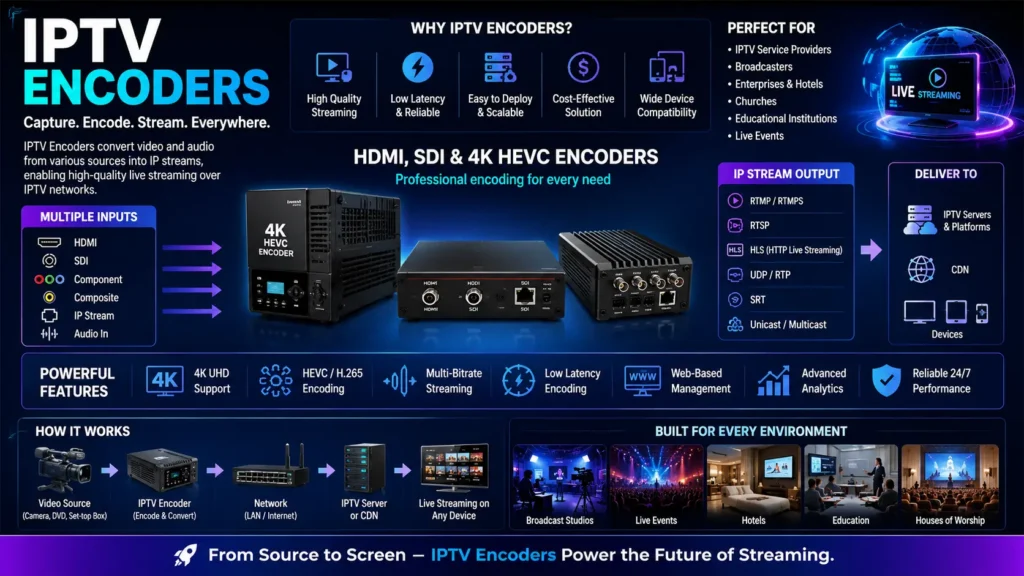
Encoders sit at the very start of the IPTV delivery chain:
Source (camera, STB, satellite) → Encoder → Streaming server / CDN → IPTV player or app
Without an encoder, a video signal is either uncompressed (far too large to stream) or locked in a broadcast format like HDMI or SDI that IP networks and streaming apps can’t read directly. The encoder is what makes that signal watchable through an M3U playlist, an app, or a set-top box.
This is distinct from an IPTV middleware platform or IPTV server, which handles subscriber management, channel guides, and content delivery — the encoder’s job ends once it hands off a properly formatted stream. If you’re evaluating the business side of running a channel lineup rather than the hardware itself, our IPTV business plan, profit, and growth guide covers that side in more detail.
How an IPTV Video Encoder Works
Every IPTV video encoder follows roughly the same four-step process:
- Capture – The encoder receives a signal from a source through an input like HDMI, SDI, or a composite/component connection.
- Compress (encode) – The raw video is compressed using a codec such as H.264 (AVC) or H.265 (HEVC) to shrink the file size dramatically while preserving quality.
- Package – Video and audio are wrapped into a delivery format — commonly HLS (.m3u8 playlists), RTMP, RTSP, UDP/RTP, or SRT.
- Transmit – The packaged stream is sent to a media server, CDN, or directly to IPTV players over the network.
The choice of codec and protocol at each step has a direct effect on latency, bandwidth use, and picture quality, which is why encoder specs matter so much when shopping for one.
Types of IPTV Encoders
HDMI Encoder for IPTV
An HDMI encoder for IPTV takes an HDMI video source — a camera, a game console, a cable/satellite box, or a computer’s HDMI output — and encodes it into an IP stream. This is the most common entry point for small businesses, churches, sports bars, hotels, and content creators who already have HDMI-output equipment and want to turn it into a live IPTV channel.
An HDMI to IPTV encoder typically includes:
- One or more HDMI inputs (and sometimes a loop-through HDMI output for local monitoring)
- Hardware H.264/H.265 compression
- Network output over Ethernet or Wi-Fi
- Support for streaming protocols like RTMP, RTSP, SRT, and HLS
SDI IPTV Encoder
An SDI IPTV encoder accepts SDI (Serial Digital Interface) input instead of, or in addition to, HDMI. SDI is the standard connection used in professional broadcast and production environments because it supports longer cable runs (over 100 meters without a signal booster, versus roughly 15 meters for standard HDMI) and is more resistant to interference. SDI encoders are the go-to choice for TV stations, sports production trucks, and live event broadcasters who need reliable long-distance cabling between cameras and the encoding rig. Many professional-grade encoders now ship with both HDMI and SDI inputs on the same unit, so a facility can standardize on one device regardless of which cameras or sources it uses.
Multi-Channel Encoders (4, 8, and 16 Channel Units)
For anyone building a full IPTV headend rather than a single channel, multi-channel encoders let you encode several sources at once from a single rack-mounted unit. An 8-channel HDMI encoder for IPTV can take in eight separate HDMI sources — for example, eight cable box outputs — and output eight independent streams, each packaged as its own HLS (m3u8) playlist or RTMP/SRT feed. This is the standard setup for hotel IPTV systems, multi-dwelling unit (MDU) deployments, and channel lineups that need to deliver a full bouquet of live channels rather than one feed.
Key Specs That Actually Matter
When comparing IPTV encoders, a few specs make the biggest practical difference:
| Spec | Why It Matters |
|---|---|
| Codec (H.264 vs H.265/HEVC) | HEVC compresses video roughly 50% more efficiently than H.264 at the same quality, which matters most at 4K resolutions where bandwidth is tight. H.264 remains more universally compatible with older players. |
| Resolution (up to 4K) | A 4K HEVC HDMI encoder with low latency SRT support is the current standard for professional live 4K IPTV distribution, balancing picture quality against the bandwidth 4K demands. |
| Latency | Encoding, buffering, and protocol choice all add delay. Low-latency encoders matter most for live sports, interactive content, or anything where sync with a live event is critical. |
| Output protocols | Look for support for HLS (m3u8/HLS), RTMP, RTSP, UDP/RTP multicast, and SRT — the more protocols supported, the more flexible the encoder is for different playback targets. |
| Number of channels | Single-channel units suit one camera or feed; 4-, 8-, and 16-channel units suit headends and multi-channel lineups. |
| Bitrate control | Constant vs. variable bitrate (CBR/VBR) and adaptive bitrate output affect how well the stream holds up on inconsistent networks. |
SRT vs. HLS vs. RTMP: Which Output Protocol Should You Use?
The output protocol determines how the stream travels from the encoder to its destination, and each one trades off latency, reliability, and compatibility differently:
- SRT (Secure Reliable Transport) — An open-source protocol built specifically to handle unpredictable public internet connections. It uses packet-loss recovery and encryption to keep quality high even on unstable links, and it has become the preferred contribution protocol for professional live IPTV and broadcast workflows because it keeps latency in the sub-second-to-2-second range.
- HLS (HTTP Live Streaming, .m3u8) — Apple’s adaptive bitrate format, widely supported by IPTV apps and players because it’s simply an HTTP-delivered playlist. Standard HLS trades some latency (often 15-30 seconds) for near-universal device compatibility; Low-Latency HLS narrows that gap to a few seconds.
- RTMP — An older but still widely supported protocol, commonly used to push a stream into a media server or platform before it’s repackaged into HLS for end viewers.
Many modern encoders — including 4K HEVC HDMI encoders built for IPTV — support SRT output specifically because it holds up better than RTMP over long-distance or lower-quality internet connections while keeping latency low, then let a downstream server repackage that feed into HLS/m3u8 for the actual IPTV players and apps to consume.
If you’re troubleshooting how a channel actually reaches a viewer’s app once it leaves the encoder, our explainer on M3U vs. MAC address IPTV authentication covers what happens on the playback side of that pipeline.
Common Use Cases for IPTV Encoders
- Hotels and MDUs – Distributing cable/satellite channels to guest rooms over the property’s IP network using multi-channel encoders.
- Sports bars and venues – Encoding cable boxes or satellite receivers into an internal IPTV system that can be routed to multiple screens.
- Churches and event venues – Streaming a camera feed live to a website or app using a single-channel HDMI encoder.
- Broadcasters and production companies – Using SDI encoders for reliable, long-cable-run contribution from cameras to a production truck or master control room.
- IPTV service operators – Building a channel lineup at the headend level using rack-mounted multi-channel encoders feeding a middleware/streaming server.
How to Choose the Right IPTV Encoder
- Match the input to your source. HDMI for consumer/prosumer gear and cable/satellite boxes; SDI for professional cameras and long cable runs.
- Decide on resolution needs. If you’re distributing 4K content, prioritize an encoder with hardware HEVC encoding rather than software-only H.264.
- Check protocol support. Confirm the encoder outputs the protocols your streaming server or player actually needs — SRT for contribution, HLS/m3u8 for broad player compatibility.
- Size for your channel count. A single-channel encoder is fine for one feed; headends and multi-room deployments need 4-, 8-, or 16-channel units to stay cost- and rack-space-efficient.
- Factor in latency requirements. Live sports and interactive content need low-latency encoding and SRT-style transport; on-demand or less time-sensitive channels have more flexibility.
Frequently Asked Questions
-
What is the difference between an IPTV encoder and an IPTV transcoder?
An encoder converts raw video into a compressed streaming format for the first time. A transcoder takes an already-encoded stream and converts it into a different format, bitrate, or resolution — for example, converting a high-bitrate feed into multiple lower-bitrate versions for adaptive streaming.
-
Can I use a single HDMI encoder for multiple channels?
Most HDMI encoders handle one input per unit. If you need multiple channels, look at multi-channel encoders (4, 8, or 16-channel models) built specifically for headend use, or run multiple single-channel units in a rack.
-
Do I need a 4K encoder if my source is only 1080p?
No — match the encoder’s resolution capability to your actual source. A 4K-capable HEVC encoder can still encode 1080p content, but there’s no benefit paying for 4K encoding if nothing you’re distributing is 4K.
-
Is SRT better than RTMP for IPTV?
SRT generally performs better than RTMP over unreliable or long-distance internet connections thanks to its built-in packet-loss recovery and encryption, and it’s become the standard for professional contribution feeds. RTMP remains widely supported and is often still used for the final leg into a media server.